Wholesale Virtualisation and Selective QinQ

Recently I have been working on a solution to provide Wholesale Access to hosted VMs. Several of my customers have “Cloud Environments” – call it IaaS, virtualisation, a fad or whatever, this is something that I have been asked to come up with a solution for more than once.

To explain the requirements outlined in this article, I should give a little background on the design requirements and constraints. For some of my customers the standard build is to include 2x VLANs for each Customer – a Live VLAN, and an Internal/Backend network. If the customer has more than one VM in a cluster then all servers will share these VLANs. Unfortunately this quickly runs through the available VLANs (And we love that the Nexus 5k only supports 512 vlans). This limited the number of customers in a single VM cluster, due to VLAN limitations inherent in Data Centre switches.
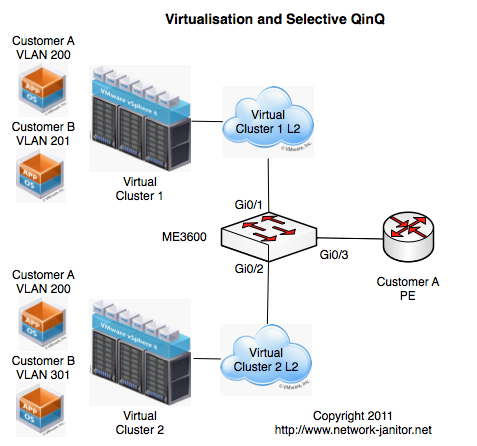
SelectiveQinQ

To scale out from these limits, and dealing with network growth and evolution additional clusters have been built and added. Each VM Cluster is self contained, including its own Compute, Network and Storage infrastructure. Within a single cluster we have allowed the use of the full range of VLANs from 1 through to 4094.

As happens with many successful ventures, customer numbers have grown considerably and with it came the requirement for third parties to be able to host their own customers within these VM clusters. I call these third parties “Wholesale Customers”, because they are buying services in bulk from the Service Provider and then splitting them up between their own distinct customers.

As a “value add” we have allowed these wholesale customers to interconnect directly with the switching fabric to we trunk the VLANs across to them as needed. This allows the Wholesale Customer to add their own services to the VLANs, or to integrate these VMs inside customer WAN VRFs etc.

The problem comes when the Wholesale Customer has VMs in more than one cluster. Do they need to order a cross-connect to each cluster or can we aggregate VMs from all clusters across a single link? Due to the VLAN reuse policy in action within the clusters, traditional switching and trunking would cause an issue as it is possible for a wholesale customers separate VMs to exist in the same vlan-id in different clusters.

Config Snippet

interface GigabitEthernet0/1
 description Trunk to Cluster 1
 port-type nni
 switchport trunk allowed vlan none
 switchport mode trunk
 service instance 1 ethernet
  encapsulation dot1q 200
  bridge-domain 3600
 !
 service instance 2 ethernet
  encapsulation dot1q 201
  bridge-domain 3601
 !
interface GigabitEthernet0/2
 description Trunk to Cluster 2
 port-type nni
 switchport trunk allowed vlan none
 switchport mode trunk
 service instance 1 ethernet
  encapsulation dot1q 200
  bridge-domain 3700
 !
 service instance 2 ethernet
  encapsulation dot1q 301
  bridge-domain 3701
 !

interface GigabitEthernet0/3
 description Trunk to Customer A
 port-type nni
 switchport trunk allowed vlan none
 switchport mode trunk
 service instance 2 ethernet
  encapsulation dot1q 300 second-dot1q 1-4094
  rewrite ingress tag pop 1 symmetric
  bridge-domain 3600
 !
 service instance 3 ethernet
  encapsulation dot1q 400 second-dot1q 1-4094
  rewrite ingress tag pop 1 symmetric
  bridge-domain 3700
 !
interface GigabitEthernet0/4
 description Trunk to Customer B
 port-type nni
 switchport trunk allowed vlan 3601,3701
 switchport mode trunk

A Solution is needed

As Im sure many of my readers know, we could easily use dot1q-tunelling (otherwise called QinQ) to encapsulate traffic from each cluster inside an outer vlan (Referred to as a Service VLAN or S-VLAN). The downside to this solution is that each wholesale customer would need a separate QinQ port per cluster, and this could get very unwieldy very quickly. I needed to come up with a solution that would scale better than this, without requiring needless wasted ports within the switching infrastructure.

We outlined the following requirements:

  • Allow full VLAN range use within a cluster
  • Allow each the same vlan-id used in different clusters be sent to the same wholesale customer
  • Allow for future integration with the proposed MPLS routing between clusters and DCs
  • Be economic on scale and reduce wastage
  • Allow the same wholesale handoff infrastructure to be used by multiple customers

I knew that I could accomplish these requirements using a Service Provider technology called “Selective QinQ”. Essentially this allows a single incoming port to determine the S-VLAN to according to certain attributes of the incoming packet. With this in mind I went through the various vendor offerings on this front, and in the end we settled on using the new Cisco ME3600-X Metro Switching platform.

Enter the Cisco ME3600

The Cisco ME3600 is a new offering in Cisco Metro Ethernet series of switches. The Metro switches, as their name implies, are aimed at Service providers building large cross-city ethernet networks. These type of networks have very similar requirements to those I listed above – in particular facilitating the carriage of distinct customer traffic across a common backbone while maintaining scalability and economic hardware investment.

The ME3400 has long been the bastion of this family of switches, being used all around the world in the basement of many buildings providing access into Service Provider networks, so naturally this was the first place I looked for a solution. We quickly determined that the new switch on the block, the ME3600, could meet both our current and future requirements so we ordered a pair of these for our tests.

This new switch introduces some new features over and above the ME3400, in keeping with the definitions of the Metro Ethernet Forum (MEF). In particular it utilizes three particular features that might be new to engineers used to working with traditional Cisco Catalyst switches.

Ethernet Virtual Connection (EVC): An EVC is a logical collection of interfaces within a service provider network that is linked to a particular end customers network. These can be either point-to-point or multipoint-to-multipoint.

Bridge Domain: A Bridge Domain is broadcast domain that is local to the switch, but is not limited to a certain VLAN. This allows a set of Service Instances on ports to be treated the according to a defined pattern.

Ethernet Flow Point: An Ethernet flow point is a logical flow or set of traffic within an EVC and Bridge Domain. On the ME3600 an EFP is represented as a Service Instance on an individual interface. Service Instance numbers are unique to the interface and do not relate to the same instance number on another interface.

The Design

Now essentially my design was to take the ME3600 switch and turn it on it head. In my design WE were going to be the end customer, and the wholesale customer was going to be the “Service Provider” or upstream side. As is shown in the diagrams above the Layer 2 network from each cluster is configured with a trunk link into the ME3600. On ingress the switch would match based on incoming VLAN and assign traffic to a bridge domain associated with the wholesale customer. One bridge domain, per Wholesale Customer, per Cluster. On egress the switch will assign a set S-VLAN as determined by the bridge domain of the traffic.

If you refer to the Config Snippet above, and look specifically at the config for Interface GigabitEthernet0/1 (The link to Cluster 1) you will see two seperate Service Instances defined:

  • Instance 1 is configured to match incoming traffic with the 802.1Q vlan-id of 200, and assign it to bridge domain 3600.
  • Instance 2 is configured to match incoming traffic with the 802.1Q vlan-id of 201, and assign it to bridge domain 3601

Most of this is straight forward and as you can see, Interface GigabitEthernet0/2 is configured in a similar fashion. You should note from the diagram that Customer A has two VMs each of which is located in “VLAN 200”.

The interesting work happens on the ports heading to the Wholesale Customers. There are two possible options, and I have shown both of them in the Config Snippet above.

  1. As is shown on Interface GigabitEthernet0/4, you can simply configure the outbound port as a trunk. In this case all traffic in the bridge domain will be encapsulated with the S-VLAN tag matching the Bridge Domain id. In the case of Customer B this would be vlans 3601 and 3701.
  2. The other more flexible option (and the one I have chosen to go into production with), requires a little extra configuration but is a lot more flexible. As shown on Interface GigabitEthernet0/3, I have configured two Service Instances – one for each Bridge Domain. Service Instance 2 is linked to Bridge Domain 3600 and is configured to take an packets inbound on the port with an S-VLAN of 300 and dump it into the Bridge Domain. The rewrite rule essentially says to reverse the procedure for any packets egressing GigabitEthernet0/3. Service Instance 3 takes traffic in Bridge Domain 3700 and associates it with S-VLAN 400.

In the example included here, The Customer A VM in Cluster 1 would have an S-VLAN of 300 and a C-VLAN of 200. The VM in Cluster 2 would have an S-VLAN of 400 and a C-VLAN of 200. When they traverse through the Wholesale Customer network they will remain distinct and separated. The biggest advantage to using the second method is that you are able to set an S-VLAN that is suitable for the Wholesale Customer without worrying about having that VLAN clash with those inside your own network.

There are many other features possible on the ME3600 utilising Service Instances and Bridge Domains that I have not covered here. These include Layer2 Protocol tunneling, Split Horizon groups to ensure certain ports in a Bridge Domain do not share traffic which can be utilised in to control loops in the network.

I hope this has been a useful introduction to the ME3600 and Selecting QinQ, and in particular using it in a location that it was not originally intended.

Feel free to add your own comments and view points, as this is still a developing design so I am happy for all your input.

NOTE: It should be noted that this switch is essentially transparent to your network, and that you are also bridging the Layer2 in your network with that of a third party, and all measures should be taken to reduce the impact of third party network problems taking out your own network.

Comments (5)

Banished from Priv15

I was recently called into a new customer’s network to help recover some passwords on some Cisco switches and to map out the network structure. Unfortunately nobody had any idea of the last time the switches had had their configs saved or even when the last time the switches had been power cycled. From what I can gather the previous IT guy didnt leave any information for those who followed.

TIP: Dont do this. It just makes people curse your name!

The problem here was that this network was carrying somewhat sensitive information and any “unplanned outages” would need to be minimised to an appropriate outage window. We did some physical tracing of the equipment connectivity and determined an eligible switch that only had a couple of nodes plugged into it, and no other switches hanging off it (as best we could tell). We scheduled an outage (thankfully it turns out that the middle of the day was actually the best time to do this), and just as we were about to start the first recovery one of the onsite guys found a USB key that just happened to have a very old backup copy of one of the configs. And just my luck the “line vty” password was in clear text! It cant hurt to try this password on the console can it?

WHAM! Unprivileged access. That was almost too easy 😉 A quick check around some of the other switches confirmed the same password on all of them. So I now at least had some form of access to the switches. I still needed to reset the enable secret entry which would require a reboot of the switch to perform, but maybe I would be able to gather some more information about the running state of these switches before a reboot. Maybe I could save myself from all sorts of hell if the configs weren’t saved after the last set changes,.

Now I, like Im sure many of you, spend most of my time on network devices barking my commands from the Ivory Towers of Priv15 land. I’m used to typing commands and having the router or switch go out of its way to provide me with any decadent output I requested! How much could I learn about these switches from the land of the plebs (What is this “>” prompt I see before me?). So I investigate…

“show tech” – OK, so I expected this one to fail, but I had to be sure 🙂

“show run” – This was another I expected to be slammed shut in my face!

“show cdp neighbor” – Not likely, but maybe? – NO CDP FOR YOU!

“show ip int brief” – Yes! First success, and now I know about any active primary IP addresses on this switch (TIP: “show ip int | inc Vlan|Int” provides a really handy output)

“show vlan” – Yes!

“show interface” – Yes

“show interface summary” – A given after the previous entry worked. A good overview though.

“show interface trunk” – Yes, and know I can re-create switch trunks with a little more confidence.

“show interface switchport” – Oh, now this is a good one. Lots of information about each and every port on the switch should I need to rebuild the configs

“show mac address-table” – Handy to know how many devices were coming in over a given interface before the reboot to cross check

“show ip arp” – Much like the previous MAC table

“show ip route” – What sort of routing table layout does this device have? What sources of routes? Static and Connected – any dynamic routes?

“show version” – Now I know how long the device has been online, what version it is running, and any changes to the config-register.

“dir flash: “ – No… but

“show flash:” – This gave me the exact same output that I would have gotten from “dir flash:”, so Im not sure why its not allowed by default.

From the “show flash” and the uptime value from the “show version” output, I was able to reasonably estimate when the config was last saved. Mind you when your switches dont have the clocks set and they think it is 1994 and the file modified date was 1996, you can rest assured the config most likely hasnt been saved since the last reboot!

So I felt pretty happy with myself about being able to get as much information as I reasonably could about these switches. When speaking to Ivan over at IOS Hints, he said that the fact I was able to get that much information from the devices might be worth noting for other people, and possibly used as part of your security measures for increasing the privilege levels required to run these commands on your production equipment if you are so concerned.

My tests here are just a few of the many commands available to non-privileged users, and I would be happy to hear from anyone else with some useful additions to the lists I put together here.

As always comments, flames, fanmail welcome!

Comments (4)

My favourite tool in my toolbag!

It’s seems to be the craze this week to write all about our tool bags. Stretch wrote an article on it, followed by Jeff Fry‘s blog post and Tony Mattke over at Router Jockey. Not to be out done (and ever the trend setter) Jennifer Huber wrote her post 18 months ago!

So I guess to be just like the cool kids, I should write a post about my tool bag. Well I was going to, then I realised that despite how nerdy we all really are, there a limit to how many pictures of screwdrivers, cable testers and multimeters that we can actually all look at. Yes I carry the usual sorts of cables, screwdrivers, multimeters and crimping kit. I used to take my Leatherman everywhere until a run in with Airport Security on the way to Cisco Live in Melbourne (a moments silence please!).

Instead I have decided to write about my second most useful bit of kit I carry around. Up until yesterday I might have told you my favourite tool was the cage nut tool, but seeing as Jeff has already extolled the virtues of this tool I decided that I should talk about my “Second Favourite Tool”.

Now wait for it… My blog post is about the roll of purple masking tape I keep in my bag!

Photo

I first bought this roll of tape for a data centre move I was doing that involved unracking 5 racks worth of equipment and moving it across the other side of town in a single night. Since then I have always kept a roll in my bag ever since.

Now I don’t want to take any of the mystical powers away from Duct Tape (which still remains “The Force” for all things DIY), but there are certain advantages to having a paper based tape in your tool kit:

  • You can tear it with your tiny girl hands
  • You can write on it with pen, pencil, sharpie or even crayon (dont ask)
  • You can remove it very easy (So the exact opposite reason to why Duct Tape is great)

The advantage of the purple colour is that it is a less used colour in the data centre so you can usually see it in the rack (Except the last time I used it when the rack was full or purple cat-5 cables… or if you use Extreme Networks switches).

I will often use this purple tape to tag cables as I unplug them from active equipment during moves or upgrades. Now Im sure everyone labels there cables in a sensible and efficient manner, but just in case its easy enough to remind yourself “Router-A:Gig0/0” at this stage. I then work through what ever changes I was making and as I plug equipment back in I remove the tape. In theory if I follow this procedure I should be able to look into the rack and not see any purple tape, and thus I should have every thing plugged back in as before.

NOTE: Purple Tape cannot stop you from plugging a cable into the wrong port!

Now please by all means, go and spend lots of money of good screwdrivers, cable testers and other tools, but think about throwing in a roll of paper based masking tape as well.
Postscript: Please don’t be dazzled by this blog’s first every use of images! Welcome to the future people – this is what 2011 is like 🙂

Comments (1)

Finally – I am a swimming pool!

Ok all, Im going to let out a secret. Long ago when I was a small child (long before I dreamed of being a janitor), when people would ask me what I wanted to be when I grew up I would answer:

“I want to be a swimming pool”.

Cute, no? I guess not, but that never stopped my folks from telling it to everyone of my friends. In fact my Dad put that in his speech he made at my wedding. Usually I would go all red in the face, but denying it was pointless.

This may seem like a weird introduction to this post, but self-deprecation is not a problem to me and on top of that, I am now owning my former aspirations – I’m “taking it back”!

I was sitting in a Juniper training course for the last two days, and during one of the breaks the topic came up about certifications and about people collecting a wide range of certifications and spreading themselves thin. At this point I made the following statement:

“I generally think about our skills and abilities as being a volume of water. We can either have a very deep understanding like a diving pool, or a wider but less deep understanding like an olympic swimming pool.”

At the time I made this claim I was trying to explain a concept in terms I could explain to people. It wasn’t until my drive home and later thinking about writing this post that I remembered my childhood dreams.

Thinking through this line of thought, I started thinking about my own career progression and in particular changes that have come about in the last 12 months. I have worked as a network engineer for the past 11 years, and I can see some stages of growth.

The Kiddy Pool

When I started my professional career in 1999 I had already been using computers for most of my life, and had experience with Linux as well as programming experience. What I soon learnt was that I really didn’t have a lot of experience, but I had a few skills that I could build upon.

My first boss took me under his wing, and taught me a lot about Client-Server computing, hardware repair, customer interaction and regression testing. During this time he was preparing the foundation for where the rest of my career would go.

I learnt quite a few skills in this job, but I knew that to grow I would need to move to another company where I would not be viewed as “The Kid”.

The Lap Pool

About this same time I had a friend who had been working for a consulting company who were also an ISP for their customers, but he was leaving for a new career in the Computer Security industry (Just like everyone was in 2000!). Given my experience with both Linux systems as well as my skills gained from my previous job in Microsoft networks I was able to gain exposure to a varied collection of customers and requirements.

This was the job where I first learn about Cisco equipment. I was handed a Cisco 800 and a print out and told to go install an ISDN service for a customer because nobody else in the company were “Cisco Guys”. This was followed a few weeks later when our upstream transit provider had a network failure and I was forced to troubleshoot our core router using only a console session and a copy of the DocCD I found on a bookshelf. Fun times 🙂

I was working here when Windows 2000 was first released, and everyone had a steep learning curve ahead of them. We had a customer with a new Windows network being rolled out, and our main Microsoft consultant was preparing to do the rollout. Due to unforeseen delays he ended up being away for 4 weeks when the project finally got the go-ahead, so it landed in my lap to implement. Unfortunately I had no notes or documentation from the previous guy, so I had to learn it all on the spot.

This particular company had a very strong emphasis on certification, Microsoft in particular to maintain their partner status. I was able to learn and study here due to the exposure I was given and was able to achieve my Microsoft Certified Professional certification. I also convinced them to buy me the study materials required to gain my CCNA (it is 2001 by this stage).

By now I certainly was gaining a broader set of skills, and they were starting to get deeper.

The Olympic Swimming Pool – Round 1

Not long after I passed my CCNA I changed jobs (for various reasons), and was offered a senior position at the first company I was working for. My first day at this job was September 11 2001 – so this is probably not the most newsworthy thing to happen at the time.

Over the next two and a half years I was able to utilise my skills with Microsoft Networks, coupled with my networking theory and my Linux skills to develop several multi-site networks incorporating all manner of “Directory Services”, “Collaboration” and other buzz word compliant systems. I hired a few friends into this company (one of whom I still work with quite closely).

During this time in “The Olympic Swimming Pool” I was still dealing with a broad range of skills and technology owing mainly to my job role as a consultant. There was systems administration, desktop support, hardware builds and troubleshooting, programming and customer support. The depth of my skills was also starting to get deeper.

Sunbathing by the side of the pool

I knew at this stage that my ideal job was working specifically in computer networking. I mean REAL networking. Routers, switches, blue cables. Not PCs, and very few servers. I decided to take leave my job in early 2004 and I worked for he next 18 months doing various non-IT related jobs. This is also around the time I moved out of Sydney and up to the NSW Central Coast.

During my time away from the industry I really discovered how much I enjoyed working in IT. As with many geeks I couldn’t keep myself away for too long. Thankfully a few days after deciding I should return to IT, I received a call from a friend who had an ISP customer looking to hire a Network Operations Manager – and they were based on the Central Coast.

The Empty Diving Pool

I like to think that by the time I made it to this stage in my career I was standing at the bottom of a diving pool in about waste deep water. I was focusing on Service Provider networking. In particular this was a Wireless ISP, so I was dealing with a whole range of new technologies. Some of these technologies only had a handful of implementations around the world, so the user and support communities were very small.

I was finally away from desktop support, and all of the servers I was looking after were specifically related to the functioning of the network itself. I still had to deal with customer support while we built out our Helpdesk and Support staff. I gained experience with project management as well as working on large network deployments that spanned hundreds of kilometres.

When I started there we had had about 150 customers. Over the time I worked there we grew from that base to over 20 networks across Australia and bought and integrated several other ISPs on the way. Each new acquisition was another technology and “unique” user base. By the time I left there were about 10,000 users across the different networks.

Filling the Diving Pool

After 2 years at this company I was ready to move on, and my friend who introduced me to the Wireless ISP offered me a job working at his consulting company. I was employee #2. Since then we now have a team of network engineers, systems administrators and programmers.

This is the position I currently hold, and during my three and a half years in this job we have been able to land some pretty impressive and interesting projects and contracts. I have designed and managed many ISP networks and evolved my designs of optimal network design in relation to Wholesale providing of end user services as well as scalable Co-Location facilities. I have designed and implemented large networks that only lasted for 14 days during an international event including manning a 24 hour by 8 day media centre for all international media outlets. I have worked on designing networks for Digital Cinema delivery, as well as large Enterprise WAN deployments.

The opportunities presented in this role have enabled me to also take on a new path in my career, one that I never imagined I would be able to do – I have now presented Technical Presentations and Training seminars in several different conferences across the Asia Pacific region. The skills I have learnt during this process are very different from those in my technical background. Each new speaking engagement has taught me something new and I am taking all advice and criticism on board and trying to improve with each new opportunity.

The Future

From my current standpoint, the future of my career looks to be heading back towards the Olympic Swimming pool phase – not as deep but covering a wider range of skills. Maybe not the same skills from the last time I did a few laps in this pool, but certainly broad none the less. I expect to be focusing more on design and team management, and leaning towards supporting my existing engineers in developing and implementing the solutions we come up with.

This very blog, as well as other social media such as Twitter, has also opened up a whole new world of opportunities, and I am looking forward to spending more time focused in this aspect over the next phase of my career. The people I have “met” and the opportunities to engage and interact with people from all aspects of the IT and in particular the networking field has been amazing.

Final Thoughts?

So that has been a somewhat narcissistic look at my career progression so far. In short I feel that we each start our careers with a set of abilities and improve and expand upon those through out our career, but at a point your skills can either go deeper into a specific subset of topics, or broader across a wider range of topics. Your particular career path and goals will determine how and when you will spend time in each of these swimming pools.

For now, I am owning the fact that I am indeed a swimming pool. If I ever become a hot tub I promise to invite you all around for BBQ and a few drinks!

Feel free to comment (or to ridicule my childhood ambitions!).

Comments (3)

You can’t buy Innovation

Last weekend I was interviewing a potential new staff member for a job we have going, and we started discussing various vendors strengths and weaknesses. I put forward that I would question buying hardware from a vendor who just copies everyone else and doesn’t innovate on their own undertaking.

The response from one of the people present was that you can buy innovation (eg Cisco buying back Nuova, HP buying 3Com and thus H3C). I didn’t respond at first to this statement because I wasn’t really sure how I felt. After some thought I have decided how I feel.

You cannot buy innovation, you can only buy innovative product lines. Innovation is an ongoing process

Anybody with a hefty wallet can buy a company who is making some new products and bring them into your own portfolio, but this is only buying an innovative product line. To be truly innovative is a corporate culture kind of thing. If your company does not believe in innovation as a way of life then purchasing any new products is only going to move you in very small baby steps – steps that will possibly become dead-ends without appropriate investment in research and development.

Corporate Culture can be changed or learned. Various companies throughout corporate history have brought in new management who have been able to change the core practices. Sometimes this can be through grass-roots change, or from a visionary new C-Level exec, but without fail it has required key changes be made to how the company does business and what values are important to them.

I’ve said it before, and I will say it again if you are just doing what everyone else is doing then why should I buy from you?

If you are waiting for the standards instead of innovating new ways to do things today, then I guess I will come back to you next refresh cycle – cos you cannot meet my needs today.

Maybe this is a naive view, and as always Im happy for those wiser than me to “show me the light”

Comments (1)

Introduction to Data Centre 3.0

So I woke up this morning to a couple of people on twitter talking about my Data Centre 3.0 presentation from NZNOG in January. I was really confused why people would all of a sudden start talking about this 2.5 months after it was presented. As I was leaving work tonight I checked my RSS feeds to see that Greg Ferro had posted a new article to his blog with a link to the video recording of that presentation.

I guess I should make a mention of that presentation on my own blog too ( for some reason, I hadnt really thought to do that previously!). This is a brief introduction into some of the newer technology coming out focused on the Data Centre market. Lots of new and interesting technology is involved in this space and there is a lot of work out there for engineers who are up to speed with what is coming 🙂

A couple of people have asked about the slides, so I have included them here so you too can follow along at home. I have also presented a slightly updated version of this presentation at APRICOT but that session was not recorded.

PDF – Introduction to Data Centre 3.0 (NZNOG-2011)

Let me advise that Im nothing special to look at and my voice and suggests that Im best suited to being a mime during a blackout, but hopefully you can get something useful out of this.

If you enjoyed this presentation, please sign up for Ivan Pepelnjak’s webinar on Data Centre 3.0 for Network Engineers as he goes into a lot of depth across a broad range of topics. Be sure to look at his other webinars as well – there are bound to be many that interest you!

Leave a Comment

First Step Down – Written Complete

I havent blogged at all for March (and this is only a very brief one) because I have been very busy studying and it seems to have paid off! I managed to get the first step towards my CCIE R&S exam out of the way last week – I passed my CCIE Written exam 🙂

I made the commitment back in December to sit the exam while I was at Cisco Live Melbourne 2011. If you have been following any of my tweets so far this year you may have noticed that I have spent nearly as many days out of the country as I have in. My work travel schedule was pretty hectic for January and February and I didnt have as much time dedicated to study as had hoped.

When March rolled around and I knew that I would be spending the last week of that month down in Melbourne I knew I had to kick my study into overtime! I received lots of encouragement from many of my friends on Twitter but I can tell you I really wasnt feeling ready for the exam (even as I walked into the room!) but I managed to pass – much to my relief!

Now that I have passed, I am working when to schedule the lab. I am thinking either September 9th (My Birthday!) or in the beginning of December. Either way I know that if I do not set a hard date I will keep putting off the serious study required to complete the lab!

Comments (1)

Multi-Vendor Networking – The Two Edged Sword

A couple of weeks back, when we recorded Episode 33 of Packet Pushers Podcast, one of the items we had on the list of topics to discuss was that of multi-vendor networks and the recent Gartner report on the topic.

Due to various reasons this topic was taken off the list, but I still had a few thoughts on the topic so I decided to write this blog post to discuss some of them.

The Gartner Report

In late 2010 I attended a HP Australia executive briefing and breakfast in Sydney. The keynote speaker at this event was Mark Fabbi, and I had the honour (luck?) of sitting at the same table as him during the event. Mr Fabbi was the author of a paper called “Debunking the Myth of the Single Vendor Network”. The presentation was aimed at C-level executives along with the various Magic Quadrants that we Network Engineers love to laminate and stick to the walls of our cubicles!

Whilst telling us (well me at least) something we already knew, he laid out in a fashion suitable for presentation to upper management for discussion and approval to add addition vendors to your network.

Suggestions have been made that vendors with deeper pockets have been pushing the agenda for these reports, but I think that at the end of the day there are compelling reasons not to have vendor lock-in.

The right tool for the right job

At eintellego we specialise in building multi-vendor networks. I like to call this the “Chasing Amy School of Network Design”. Anyone who has seen that movie should know what I am referring to, but basically why should I limit my choice of devices to one particular vendor. If there is a better tool to complete the task I am trying to do then I will not put blinders on because it does not come from my vendor of choice.

By way of an example, for quite a few years we had been selling and supporting the Cisco PIX and ASA platforms for our customers because we felt they offered the best overall hardware firewall solution for our customers. Other vendors had products that were competitive but none of them were compelling enough for us to move away from the ASA. Then in mid-2009 in a space of maybe 3 weeks I had two separate customers ask me on my opinion of the Juniper SRX platform. I had previously looked at Juniper equipment and was quite impressed with the Junos Operating System, but when it came to firewalls I was not impressed with the ScreenOS options. I could have easily just dismissed the new product because it wasn’t from Vendor X who I was used to buying from, but after several recommendations from colleagues as well as requests from customers I decided to take a look. And I am very glad I did!

What I found was a product that met several of the short comings I had with the ASA platform (dynamic routing with redundancy etc), was based on the Junos Operating System, and had quite an impressive throughput and capabilities for the price. Today at eintellego we will recommend and sell SRX solutions to our customers before an ASA solution because we feel that in 2011 it is truly a better option.

Multi-Vendor for the sake of Multi-Vendor

One point I should make clear is that I do not advocate multi-vendor when it is not required. For a long time the Security Industry Best Practice promoted the idea of separate firewalls from separate vendors. While there are sensible reasons behind this approach (vulnerability in one platform will be safe on another), often during the implementation one of the two devices was treated worse than the other. Maybe installing the second box was to achieve a “tick in the box” for some industry security certification, or maybe a choice by a previous admin who no longer is there to champion the cause for the device, but sometimes one of these boxes was modified and updated far less than the other.

Why should we make our lives complicated for ourselves? Why would I force myself to use, say, an ASR and an MX series router as my border routers purely to meet the requirement of multivendor. Valid reasons may exist for this solution, buy “multi-vendor” is not that reason.

I need to learn another System?

I often hear from engineers that they do not want to learn another operating system. I usually laugh at this point at tell them their future doesn’t look that bright. Even within a single vendor you have several new operating systems now, an depending on the direction your network takes you, you may find yourself working with IOS, NX-OS, IOS-XR and/or possibly IOS-XE.

When I train my staff in networking concepts, I try to re-enforce the theory behind the solution or protocol more than the commands required to complete the solution. If you understand why Spanning Tree or OSPF behave a certain way or respond to an event in the network, it does not matter what operating system you are on, all you need to do is work out where to find those options. Knowing the right commands is only 10% of the job!

As an example, we recently rolled out 500+ HP E-series switches for a customer. Prior to this project my experience with the (former) ProCurve range was limited mostly to simple Layer 2 designs with a little bit of AAA and SNMP thrown in. After about an hour of playing on the device, I was already comfortable with the CLI and ready to start “translating” the config I was after into the correct dialect.

ProCurve CLI is very similar to IOS you say? Well how about Junos then? I think we can all agree that Junos is significantly different to many of the other competitors, but it only took me a day or two in the lab before I was comfortable enough to deploy some of these in a semi-production network to start getting some real world experience.

If you’re working in the network field DO NOT be afraid of new tech. That doesn’t matter if it from the same vendor or a new vendor.

My Vendor is the only one who does X?

Personally I think this one falls under the same heading of “The right tool for the right job”, but sometimes people have engineered themselves into a corner and decide to continue implementing the same solutions because to change or re-design is “too hard”.

Maybe you deployed a proprietary protocol and now you are locked into that vendor. In a previous post I discussed how I was not opposed to proprietary solutions, particularly when they are the only option for a solution. Does this mean that you should stick with this solution when new alternatives exist? The same driving force behind the implementation of the proprietary solution should drive the review of new alternatives – The right tool for the right job!

I understand that certain environments have strict design/innovation schedules, and that once a network is built it is extremely hard to get changes made, but we should always be looking for the best way to do our jobs and to design our networks. Don’t be designing networks based on the text-book from 10 years ago!

Wrap up

Multi-Vendor is not scary or hard, as long as you do it for the right reasons.

Feel free to share your comments, flames or multi-vendor nightmares 🙂

Comments (3)

Proprietary Cometh before the Standard

Driving home the other night I was listening to the latest episode of the podcast “Coffee with Thomas”. This episode had our host, Thomas Jones, interviewing Steve Chambers of ViewYonder (and also a history of great vendors!). During the interview, Steve made the following comment:

It amazes me that people criticise Cisco for not be standardised on things that are brand new, as if the standards bodies are innovators. That is not their job. They follow up after things have been invented.

This statement took me back at first, and I was about to write it off as protecting your own team, but the further I drove (I have a very long commute – about 100km each way) the more I thought about this statement and the evidence – both historical and current.

As network engineers we often love to get into religious arguments about which technology is better, and almost invariably a comparison will be made between a vendor proprietary solution and an open standards solution. Whether that is EIGRP vs OSPF, HSRP vs VRRP, or FabricPath vs TRILL they all seem to come down to a core need:

I have a need right now, and the standards bodies will take years to agree. Do I innovate and press forward with what I can do now, or do I wait?

When HSRP was introduced the market had a need for redundancy of Layer 3 gateway devices. A vendor saw a problem, thought of a solution, and implemented the solution without waiting for the rest of the market to catch up. And I firmly believe that this is in the best interest of the market. Once HSRP was recognised as a viable solution other vendors and standards bodies worked on bringing to market an industry standard protocol. Admittedly Cisco could have done many things to improve HSRP (proper load balancing is just one idea, though they brought similar options into GLBP), but they brought a solution to market when it was needed.

Zoom forward to today. The market today is seeing a push towards large virtualised domains (dare I say “Cloud”?), and as a side effect of this we (currently) need to implement these solutions using large Layer 2 domains. As has been the history of Layer 2 this comes with the “nightmares of spanning tree”, that seems to wake up so many admins at 2am in the morning in a cold sweat.

A problem exists now, and a solution is needed now. As is usual with standards bodies there is much debate as to how to move forward as everyone has their own opinion. In fact, which standards body do we look to? IETF with TRILL or IEEE with SPB? Life is slow in the land of standards, and while the boffins are battling it out there is a market place looking to roll out a solution to meet a need in there own environment.

So who is tackling these problems today? Well, like in the past, some vendors are claiming “There is no standard to move forward with”, or “We will support it when there is a standard”. This is not innovation – this is doing the same as everyone else. Im honestly not sure how I feel about a tech company who will only do exactly what everyone else is doing. Maybe in the sub-$50 SMB switch and router market sure – but not somebody I have to justify budgets and ROI and staking part of my career on!

Cisco’s FabricPath and OTV solutions may not be standards compliant. They do appear to have taken several of the nice features of the proposed standards and added some other features that will improve the Nexus platform overall, but they are not backwards (forwards?) compatible with either of the proposed standards.

Is this a bad thing? They have gone to market with a solution to a problem we have now. From the accounts I have heard the technology appears to do what it promised (even if it was behind schedule). With the standards “almost ratified” should they have waited so that their competitors could go to market with a solution at the same time?

The main thing I would like to hear from Cisco is that they will also support the standards compliant version when ever it finally gets ratified.

Im sitting in a hotel room in Hong Kong right now, with a whole city to explore so I will leave it here for now.

As always, thoughts, flames and comments welcome.

Comments (7)

Cambodia: Networking in a world of contrasts

As some of my readers may know, I have spent the last week and a bit in Phnom Penh (Cambodia), setting up the new office for my company (eintellego). I had never been to Asia before this trip – outside of a couple of lay-overs in Japan in 2002 and 2003, or the 45 mins sitting on the plane in Bangkok Airport on the way to Abu Dhabi last November. I had no idea what to expect when stepping out of the airport.

I had no idea of the adventures that awaited me. I could tell the story of the motorbike rider attached to a medical drip riding down the road on the way from the airport. I could tell the story of the three legged dog standing next to a guy eating what appeared to be a “drumstick”. I could tell the story of being surprised by a Gibbon (Hack the Gibbon!) while walking to the office. I could tell the story of shooting AK-47s and M-16s at a Military base (Good prices!). Maybe somewhat more interestingly I could tell the story about the border war that started on the day I arrived here when the Thai Army “invaded” Cambodia over a disputed bit of land and a 1000 year old temple on the border of these two countries. And none of these even come close to the horrible abuses in translation on almost every menu I have seen since we got here, but alas this is a technical blog so I should focus on some of the things more interesting to my readers.

The thing I found immediately obvious to me as a westerner in Phnom Penh, was the contrasts in network design. Each street was lined with power poles with what at first sight looked like messes of spaghetti cabling. Upon closer inspection, and a week of reflection, there started to be some order to the chaos I was seeing.

At the same time back in Australia that we were debating VDSL implementation over existing copper telephone lines through to how/when/where/who of the national FTTH project (called the “National Broadband Network” (NBN) in Australia), the Cambodian government made a simple rule:

“$2 USD per block, per cable payable to the government for access”

An important point to make from the above – That is per cable! Whether 12-Core or 100-Core “$2 per block”. This simple rule made it affordable for the various Carriers and Telcos to deploy a FTTH project across the city of Phnom Penh and to provide end user services for $10/month (possibly cheaper but I didn’t look too hard).

Existing copper telephone networks were either non-existent or so poorly maintained as to be unusable for anything other than voice in many areas of the city, but at the price of deploying Fibre and Coax based solutions, this hardly seemed like too much of a problem.

Another thing I noticed – Almost every cafe and restaurant had some form of Free Wifi to customers. This was usually an Open Access point, or an encrypted SSID and the wait-staff would tell you the key (Note: Ask them to write it down for you! Saves a lot of time in mis-typing the key when you could be more productively uploading pictures of your food to Facebook and Twitter!). In Australia, those places that offer WiFi usually either had “50mb total in a 24 hour period” or charged a not-so-nominal price for access. I have to say, this aspect certainly made my me happy.

iPhone + Skype + Free_Wifi = @MrsJanitor + Happy

I would also like to take the time in the post to answer the most common question I received from both friends and collegues regarding this trip:

“Why are you opening an office in Cambodia?”

I guess there are several correct answers to this, but the truth is the amalgamation of several facts:

  • We knew of several businesses working over in Cambodia working to improve the quality of life for the people there
  • Through some of these contacts we have met many Cambodians who have amazing potential and just need the opportunities
  • Cambodia gave us a presence within Asia that was no more than 2 hours flight from over 10,000 potential customers.
  • There is an organisation called CIST who, in partnership with several large Corporations (including Cisco), go out to the provinces of Cambodia to find people with potential and train them in many aspects of IT including: Microsoft Technician Training, Linux Administration Skills, and Cisco Academy training to the CCNA level.

This last point alone has proven to be a really eye opening experience. When we advertised for our current positions (mostly HelpDesk and 1st level Network Ops), we received nearly 100 applications from people who had been through this training. We did two rounds of interviews – 1st round in December, and the 2nd round last week.

I wasn’t present for the first round of interviews, but the candidates we interviewed last week were great. I have them the usual network engineering and Linux admin questions I would ask any candidate back in Australia – no softball questions! They managed to answer each question beyond what I had expected and were able to discuss various protocol level concepts as well as configuration and management ideas to show to me that they actually understood what I was asking. All of this, while explaining it to me in something other than their native tongue! I had planed to bring on an additional staff member, but hired two more engineers after that round because I was so impressed.

All of this, and the fact that the Khmer people have such a great personality and sense of humour, so I felt like I was at my second home for much of my trip.

Yes, I understand that the above advantages could be said about many developing countries, but we had the opportunity and the ability to get on the ground in Cambodia. For more information regarding the how and why of Cambodia, Skeeve Stevens is working on a post on his new blog. Hopefully it will be published soon.

Im not sure if there will be many comments on this post, but feel free to send me any questions etc.

Comments (5)